Airbnb calendar: where to find it
Looking for your Booking calendar? Here we show you where to find it.
1. Log in to your Airbnb account.
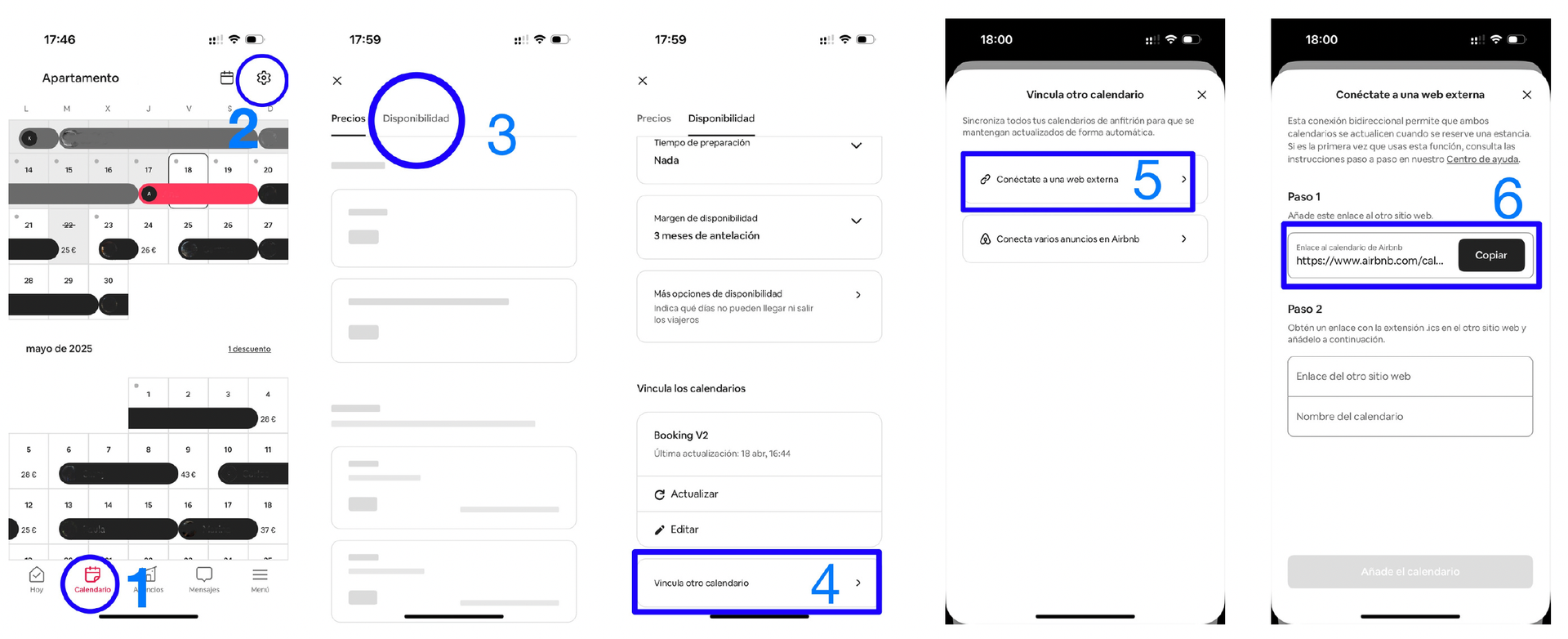
2. Click “Calendario” (Calendar) and select the calendar for the listing (property) you want.
3. On the right-hand side of the screen, click “Disponibilidad” (Availability).
4. At the bottom right, click “Vincular otro calendario” (Link another calendar), then “Conéctate a una web externa” (Connect to an external website).
5. Click “Copiar” (Copy).
This is the link you need to paste into the accommodation’s “Calendario” (Calendar) field in the iButlers app, then click “Guardar” (Save).
6. Log in to your iButlers account.
7. Go to “Alojamientos” (Accommodation), edit the property whose Airbnb bookings you want to sync, then in “Calendarios conectados” (connected calendars) edit “Calendario Airbnb” (Airbnb calendar) (make sure you select the correct property).
On a mobile device, follow these steps:
If you have trouble exporting the calendar or need to do it from a smartphone, visit Airbnb’s official page.
Example of the Airbnb iCal calendar format: https://www.airbnb.es/calendar/ical/200104368852491738.ics?s=
ℹ️
Automate Airbnb messages for SES Hospedajes data with iButlers
Schedule messages for your Airbnb bookings using SES Hospedajes data. Reduce repetitive tasks, standardise communication and improve your guests' experience.
- Templates and scheduled messages tailored to each booking to avoid errors
- Using SES Hospedajes data to personalise messages